• Login
  • Register
Skill Centre
  • HOME
  • ABOUT
  • EMPLOYEE SUPPORT

How to create a new lead on CRM

Tom, 19/08/201618/11/2016, SYSTEMS TRAINING, 0

This task is completed by the Account Manager / Internal Account Manager in the Sales Team

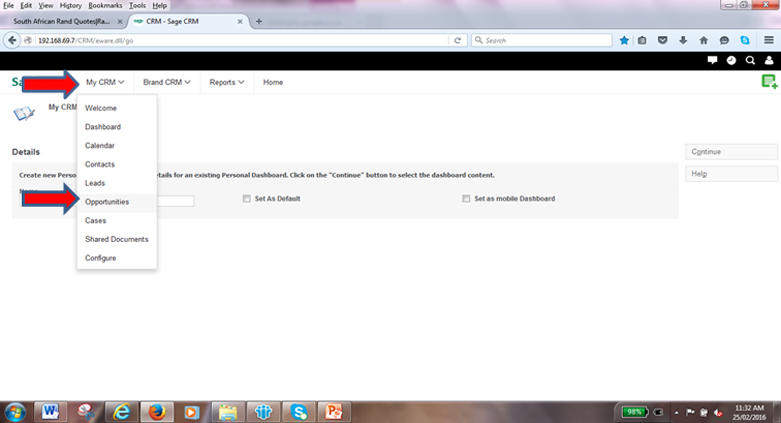
  1. Click on ”My CRM” and then select “Opportunities”. You can also perform the task from “Brand CRM, Opportunities”

sage_crm_02


← Previous Lesson

URL and Logging OnStart loading a new opportunity
Copyright © 2026 EMMC. All Rights Reserved. | Epsidon Technology Distribution (Pty) Ltd T/A Skill Centre
Data Governance | Corporate Governance | Tip Off

Login

Forgot password?

Register


CBS Africa Core Networks Evenflow EMMC First Distribution First DMT Linux Warehouse Nology

Registration confirmation will be emailed to you.

Login | Forgot password?

Reset Password

Please enter your username or email address. You will receive a link to create a new password via email.

Login