
Placing the order:
- 1st the salesperson must follow the process up to Forecasted
- Make sure all quotes/option not used is made inactive
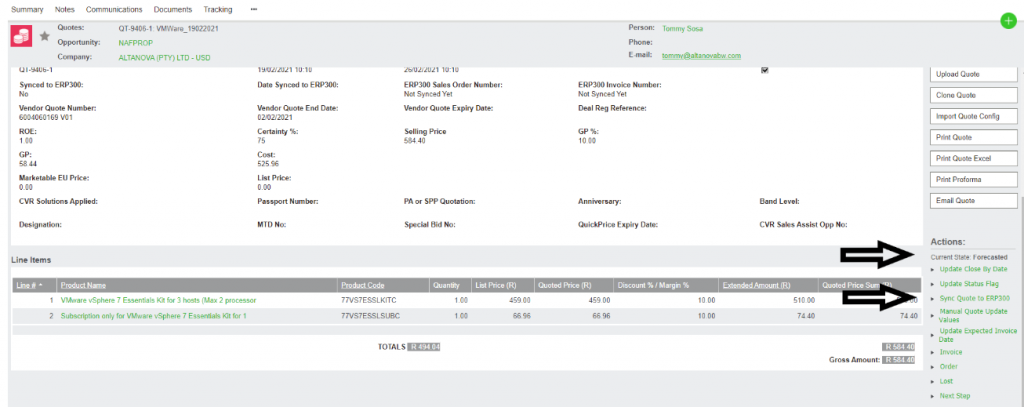
- Click on Sync Quote to ERP300 (Accpac)
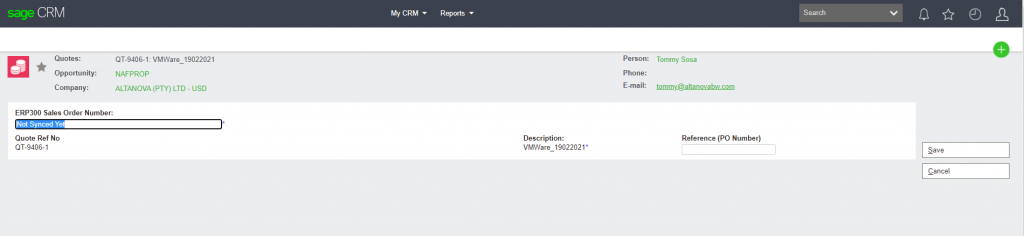
- Put in SO Number (Accpac Sales Order Number is your ACCPAC SO number )
- Put in partner PO Number (Reference (PO Number)
- The Invoice number will sync back to CRM once invoiced in Accpac
NB: If you place a manual order you will click on Order and insert the Accpac order number manually and then the Invoice number once it is invoiced. (This is only used in rare cases)
PLEASE REMEMBER TO LOG IN TO ACCPAC TO UPDATE YOUR DELIVERY DETAILS/LOCATIONS ETC.