
Order Processing
1st step:
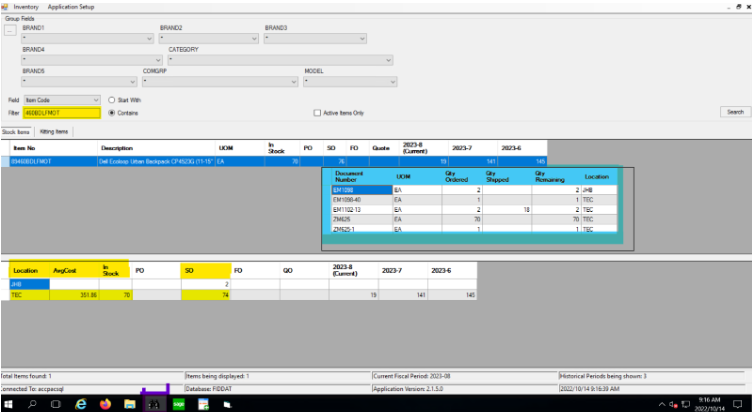
- Checking AIV/BINOX
- Checking SOH
- When checking SOH, check locations by right-clicking the in-stock icon to see quantities available in the necessary locations
- Checking no of SO/Quantities before your order
- Checking the cost.
2nd Step:
- Processing your order on Accpac
3rd Step: Prior to sending orders to JHBStores
- Ensure the necessary approvals are received if you need to take stock from another SP’s order. As soon as they have given the approval, please ask them to update their PO less the stock you received the approval of
- Ensure order is off hold (if on hold send an email to order.release@firstdistribution.com to get it released. Please keep in mind that credit should be sorted out by the relevant sales person.
- Please make sure that BM’s approves orders that are below cost as shown on AIV / BINOX
- Double-check check locations are correct for each SKU. If stock is at Technogistics Warehouse the location should be TEC.
- PO Numbers are captured
- In instances where we deliver to companies (Especially Mine sites) that require FD Customer PO number as well as EU PO number, please capture EU PO number under “reference” – note when you print your PS/SO, it will not show but when we invoice it will print and TEC is aware of this.

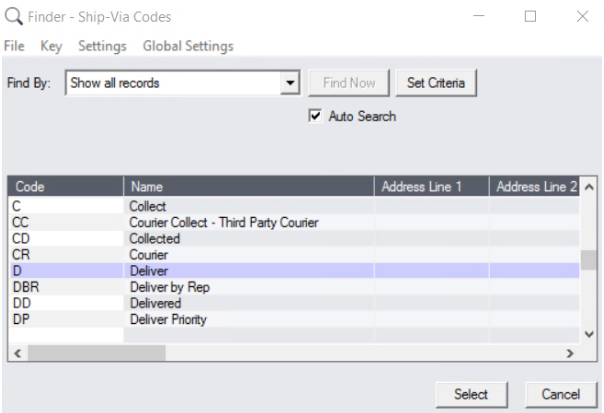
- Choose the desired shipping method by clicking on the search button
- Ensure “ship to” addresses are correct, if it’s a residential delivery please state under “ship to, contact names and telephone numbers to be captured correctly.
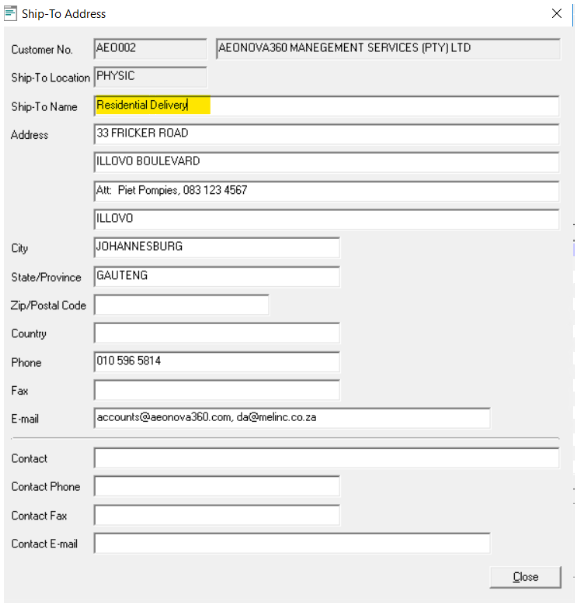
Address for Companies: Specify Building Name and/ or Office Park Details
Name of Company:
Specify Building Name and/ or Office Park:
Address Street Name & Number:
Suburb:
City:
Contact Name:
Telephone and/ or Cell Number:
Address for End User Deliveries: Specify Free Standing Home or Complex
Name of Customer:
Specify Complex Name:
Address, Street name & Number:
Suburb:
City:
Contact Name:
Telephone and/ or Cell Number:
9. For Residential deliveries please confirm with customers that someone is always available to receive the stock.
10. Add only the EU contact name and telephone number no other contact details. Email address sections are ONLY for BP’s.

DEMO PROCESS
- Create PS on customers account.
- Picking slip Number should start with “DEMO(your initials) and followed by the number
(EG DEMO SM005) - “under customer PO” type “DEMO” as the PO Number
- Under reference, type “DEMO” as well
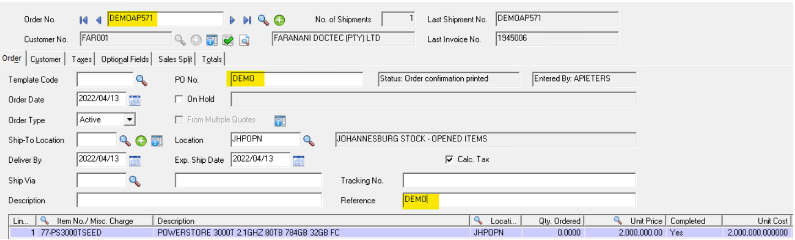
- In the “Totals Tab” this is very important, please type in, “the start date and end date of the contract”
- The Demo contract must be signed by the customer, as well as the Brand Manager, I suggest Salespeople go through the contract will the customer ensuring they understand the terms and conditions they signing as this is a legally binding document.
- If any changes after the contract have being signed, A new contract needs to be done.
- No Demo units will be picked up by FD Employees, unless prior arrangements have been made with Shamim and her team. No Demo stock will be released without SO and Demo contracts being signed.
COLLECTION ORDERS:
For collection orders apart from the 7 points mentioned above, details of courier/company/private persons details are required
NB: Collection orders should still have a physical address completed in the Ship to Address field
This is to avoid non-payments from companies on invoices. Please do not put in the Drivers Details where the shipping address should go as most of the times the partner has more than one driver. So, to avoid delays it is easier to send an email to JHB Stores and advise them of this than to credit and re-invoice or send updated SO’s.
- If a courier is collecting a copy of the waybill should be sent with your order. Choose the delivery method CC – Courier Collect – third Party Courier.
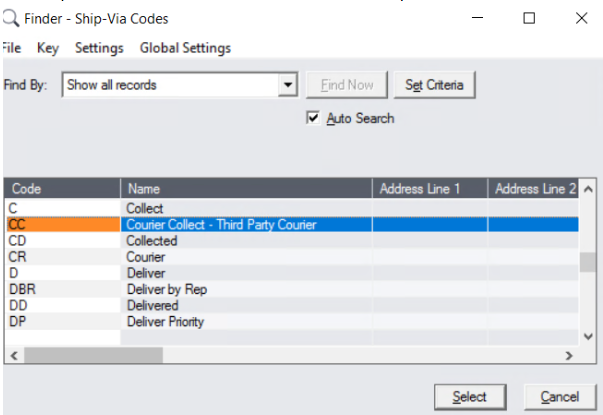
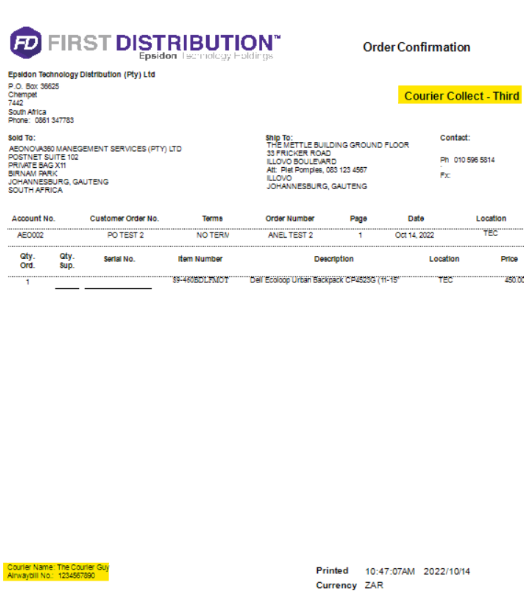
- Mention the courier company name and Airwaybill No in the Total’s comment section, this will print on the company of the SO.
- If Couriers are collecting, please ensure the courier’s name, and as is sent through to JHB Store, TEC does not fill out courier waybills for customer collections…this is between the customer and their courier, and it is their responsibility to come with correct information and complete their own waybills.

- If collected by a company driver/private person, we need the driver’s Name/ID number/Vehicle registration number. This should be communicated in email when sending to JHB stores. Technogistics has every right to turn drivers away if they cannot provide them with identification.
Choose the delivery method C – Collect.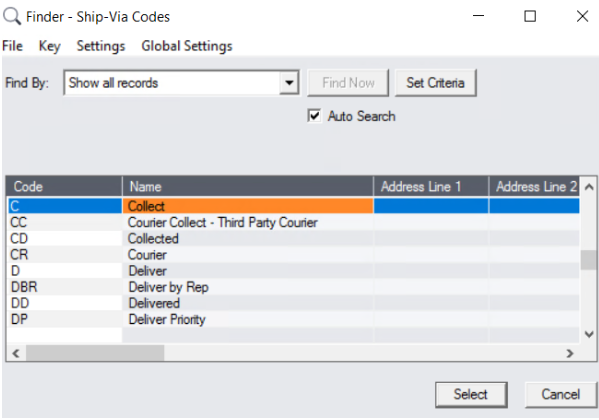
- If drivers cannot bring a copy of the invoice, then they need to provide a reference number (our Invoice number or their PO number).
- Collections need to be done within 24 hours.
Note points A and B are compulsory.
3rd Party Couriers: You will need to provide us with the below for us to provide a quote:
- The BOX Weights and Dims. Do not rely on the Vendor website for weights and dims, as TEC packages differently and we also consolidate depending on the Quantity.
- Full addresses, including Company Name/Individual Name/Contact Name and Telephone numbers.
- We need to be advised who will be covering 3rd party courier costs.
A. Overnight Services: the order has to be picked/packed and ready by 12:00 p.m. for collection the same day.
B. Cut off for normal courier services example next day/economy is 1.30 pm the same day.
Once the above 7 points are done, email your orders with all the relevant instructions, example, order off hold/approvals/ if there is an order that has software and Hardware requirements & the customer requests one invoice, JHBStores need to be made aware of this and you will need to check that the GRV for the software has been done.
When sending the email please note the below.
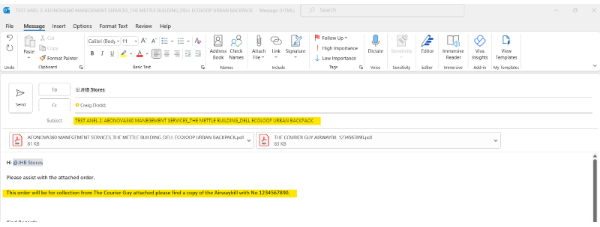
- Put SO No, BP name and EU name in the Subject.
- Communicate as much info to JHB Stores as you can to avoid confusion
- Attached is only the SO to the email and if there are any approvals received from management. If it is a courier collecting, then attach the Airwaybill.
STOCK TRANSFERS:
- If we need to send stock to TGC in CPT for holding stock, we will do a transfer.
- if we need to send stock from TEC JHB to TGC CPT for a customer to collect, the order process needs to be followed, we will pick/pack and invoice stock in TEC JHB and sent to TGC CPT for customer to collect.
RMA PROCESS:
- RMA’s to be approved by BM
- BM ‘s should be sending RMA’s to JHBstores
- With detailed instructions as per below
– Is there handling fee
– Is the unit opened or not
– If opened which location should we credit to
– Reason for return.
– A copy of FD invoice to be attached to the mail - Details of courier company/company or private person returning the RMA unit.
- RMA returns should be accompanied by the hard copy of the FD invoice when returning to TEC.
Very important to check the date of purchase before approving Returns, refer back to our invoices that clearly state the terms and conditions of deliveries.
ETA on deliveries:
- Any orders before 3.00 pm will be picked and packed the following day and despatch the same evening.
- Local orders in and around Gauteng/PTA and surroundings will be delivered the next day.
- Outlying and Regional areas, for example Durban/CT/PE and surroundings is 2 to 3 working days.
- Salespeople will not instruct Yogan for any same-day deliveries unless authorised by Neil or Shamim, clear reasons to be given why we need to deliver same day, this carries a cost to FD.
General rules:
- No customer is to call our warehouse and give instructions; all correspondence must be done via the SP OR OPS to JHB Stores.
- SP/OPS to liaise with their customers and tell them their order is ready for collection only when the invoice has been generated.
- For orders below R2500, there is a delivery charge of R395.00, Please ensure your customers are aware of this.
- Please note all communications/Instructions to TEC must be done via Shamim and her Team.